
Referral program
Goal
Send your referral link and earn a percentage of the turnover of everyone who signs up with it.
Before you start
- The Referral program item in the left menu. If it is missing, the program is not enabled for your account: contact your account manager.
Steps
In the left menu, open Referral program.
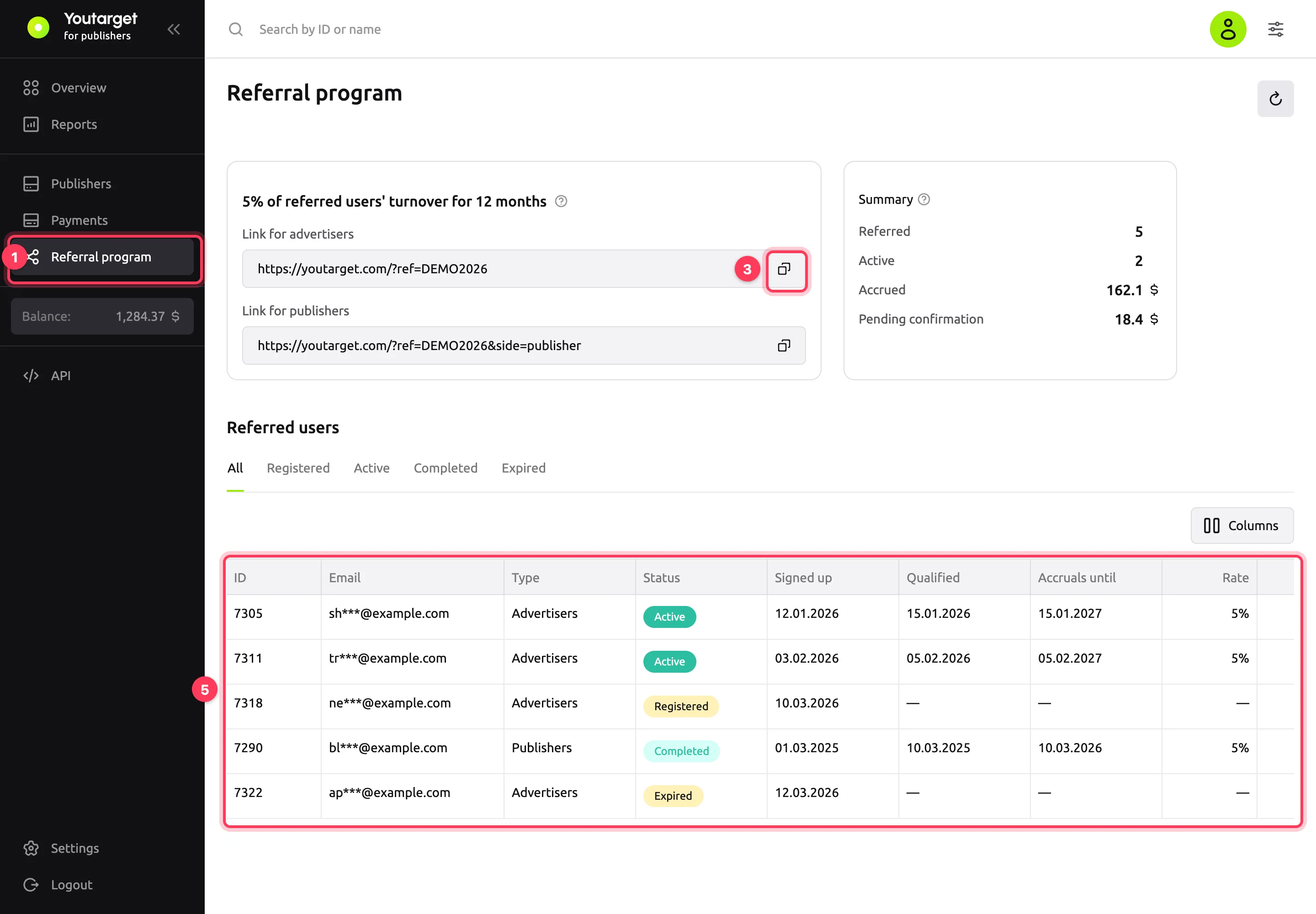
Read the terms in the card with the link. For example, "5% of referred users' turnover for 12 months" means that for 12 months you get 5% of the referred advertiser's spend or the referred publisher's revenue. If rewards have a monthly cap, it is shown in the same place: "up to $… per month". The "Individual terms" badge means your manager has set up special terms for you.
Click the copy icon to the right of the link. The dashboard shows "Copied". If there are two links, each has its own label: Link for advertisers and Link for publishers.
Send the link to the person you are inviting. The sign-up is credited to you if the person signs up within the period shown in the "?" hint next to the terms.
Track referred users in the Referred users table. The tabs above the table filter referred users by status; the ↻ button in the top-right corner refreshes the data.
Result
The referred user appears in the Referred users table. The email in the table is partly hidden.
| Status | What it means |
|---|---|
| Registered | Signed up with the link, no rewards yet. When a date appears in the Qualified column, the status changes to "Active" |
| Active | Rewards are accruing. The last day of rewards is in the Accruals until column; "No time limit" means there is no end date |
| Completed | Rewards for this referred user have ended |
| Expired | Signed up when the link was not valid and is not credited to you |
The Summary card shows how much you have earned:
- Referred: all referred users. Active: those for whom rewards are currently accruing.
- Pending confirmation: accrued but not yet confirmed.
- Accrued: all confirmed rewards over the life of the program.
Amounts in the summary are in your wallet currency at today's rate. Confirmed rewards go to your account balance.
The Rate, Accrued and Pending columns show the terms and amounts for each referred user. To change the set of columns, use the Columns button.
Troubleshooting
| Symptom | Cause | Fix |
|---|---|---|
| The "Code disabled", "Code not active yet", "Code expired" or "Sign-up limit reached" badge next to the terms | New sign-ups via the link are not counted right now | Rewards for users you have already referred continue to accrue. To invite again, contact your manager |
| A referred user has the "Expired" status | They signed up when the link was not valid | Contact your manager |
| A referred user signed up but is not in the table | They signed up after the period from the "?" hint or not with your link | Click ↻. If the user still does not appear, contact your manager |
| The table is empty and says "No one yet — share your link" | No one has signed up with the link yet | Send the link and click ↻ to refresh the data |