
Banner
A banner shows an image or an HTML creative in a block of a set size. The code loads the ad when the page opens: the auction picks the highest suitable bid.
Embed code
Paste the code where the banner should be on the page. The code consists of a <div> block and a script.
<div id="ytrgt-3f9c2b7e5d1a4c6e8b0f2a9d7c5e3b1a"></div>
<script>
!function(w,d,s,o,f,js,fjs){w[o]=w[o]||function(){(w[o].q=w[o].q||[]).push(arguments)};w[o].q=w[o].q||[];js=d.createElement(s);fjs=d.getElementsByTagName(s)[0];js.async=1;js.src=f;fjs.parentNode.insertBefore(js,fjs)}(window,document,'script','ytrgt','https://cdn.example.com/runtime.js');
ytrgt('hb:load', '#ytrgt-3f9c2b7e5d1a4c6e8b0f2a9d7c5e3b1a', {"endpoint": "https://hb.example.com/hb", "publisherId": "3f9c2b7e5d1a4c6e8b0f2a9d7c5e3b1a", "sizes": [[300, 250]], "tmax": 1000, "showAdMark": true});
</script>
One code, one place on the page. Do not paste the same code twice: the blocks get the same id, and the ad shows in only one of them. For a second place, add another publisher.
The code changes with the settings. After you change the settings, copy the code again and replace the old one on your site.
Settings
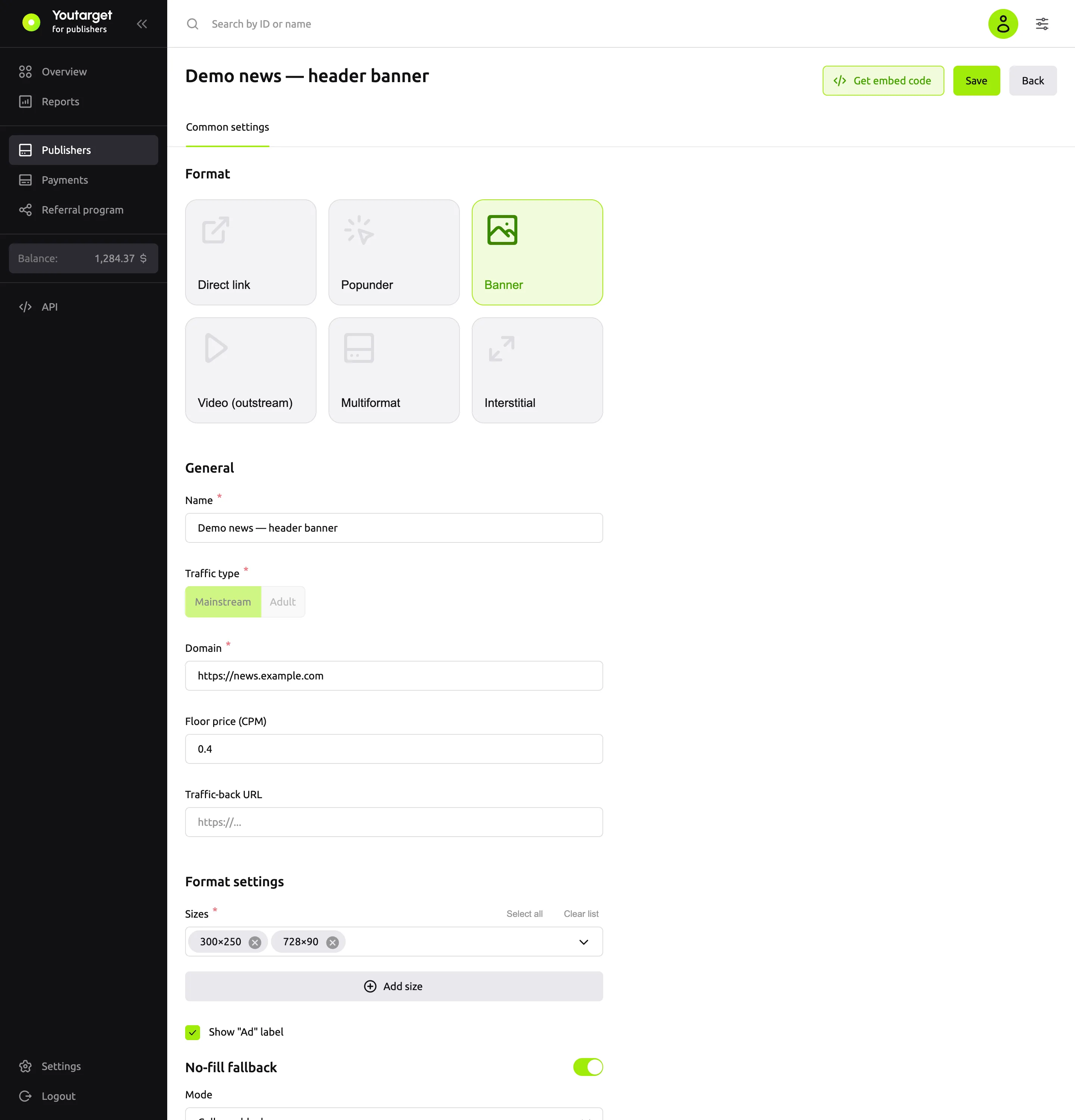
| Field | Default | What it does |
|---|---|---|
| Sizes | 300×250 | Banner sizes. Select several from the list (300×250, 728×90, 300×600, 160×600, 320×50) or add your own with the Add size button. More sizes mean more suitable ads |
| Show "Ad" label | on | Shows the "Ad" label and advertiser details above the banner. If you turn it off, the advertiser details are hidden too |
| Auction timeout (sec) | 1 | How long to wait for bids: from 0.1 to 3 seconds. Shorter means the banner appears faster, but fewer bids may arrive |
| No-fill fallback | off | What to do with the block if there is no ad: Collapse block or Show custom HTML. See below |
| Floor price (CPM) | empty | The minimum price per 1,000 impressions in US dollars |
Auction timeout (sec) is in the Advanced settings group at the bottom of the form.
No-fill fallback
If you turn on No-fill fallback, select the Mode:
| Value | What happens |
|---|---|
| Collapse block | The banner block is hidden, and no empty space is left on the page |
| Show custom HTML | The block shows your HTML from the Passback HTML field: for example, another ad network's code or your own banner. Scripts in the HTML run |
The same applies if the ad failed to load because of an error or a timeout.
Events
Subscribe to events to find out how loading ended. Instead of #ytrgt-…, use the block id from your code.
<script>
ytrgt('hb:on', '#ytrgt-3f9c2b7e5d1a4c6e8b0f2a9d7c5e3b1a', 'hb:rendered', function (bid) { console.log('Banner shown', bid.w, bid.h); });
ytrgt('hb:on', '#ytrgt-3f9c2b7e5d1a4c6e8b0f2a9d7c5e3b1a', 'hb:nobid', function () { console.log('No ad'); });
</script>| Event | When |
|---|---|
hb:win | A bid is selected, and the creative starts loading |
hb:rendered | The creative is shown |
hb:nobid | There is no suitable ad |
hb:error | A network error, a timeout, or the creative failed to render |
You can subscribe before or after the embed code.
Which ads are shown
Banner campaigns with suitable sizes.
Next steps
- Show both banners and videos in the same block: see Multiformat.
- No impressions or revenue