
Popunder
A popunder opens the advertiser's page in a separate tab when the visitor clicks on your site page. Your site stays open.
Embed code
Paste the code once on each page where you need the popunder, before the closing </body> tag. If your site uses a template, paste the code into the common page template.
<script>
!function(w,d,s,o,f,js,fjs){w[o]=w[o]||function(){(w[o].q=w[o].q||[]).push(arguments)};w[o].q=w[o].q||[];js=d.createElement(s);fjs=d.getElementsByTagName(s)[0];js.async=1;js.src=f;fjs.parentNode.insertBefore(js,fjs)}(window,document,'script','ytrgt','https://cdn.example.com/runtime.js');
ytrgt('pop:init', {"url": "https://click.example.com/direct?id=3f9c2b7e5d1a4c6e8b0f2a9d7c5e3b1a&zone_id=10542", "appearance": "auto", "frequency": {"perSession": 1}, "trigger": {"onPageClick": true}, "fallbackToCurrentTab": true});
</script>
The code changes with the settings. After you change the settings, copy the code again and replace the old one on your site.
To see revenue by site section separately, replace the zone_id value in the url address with your own, for example zone_id=blog. For how this works, see Direct link.
Settings
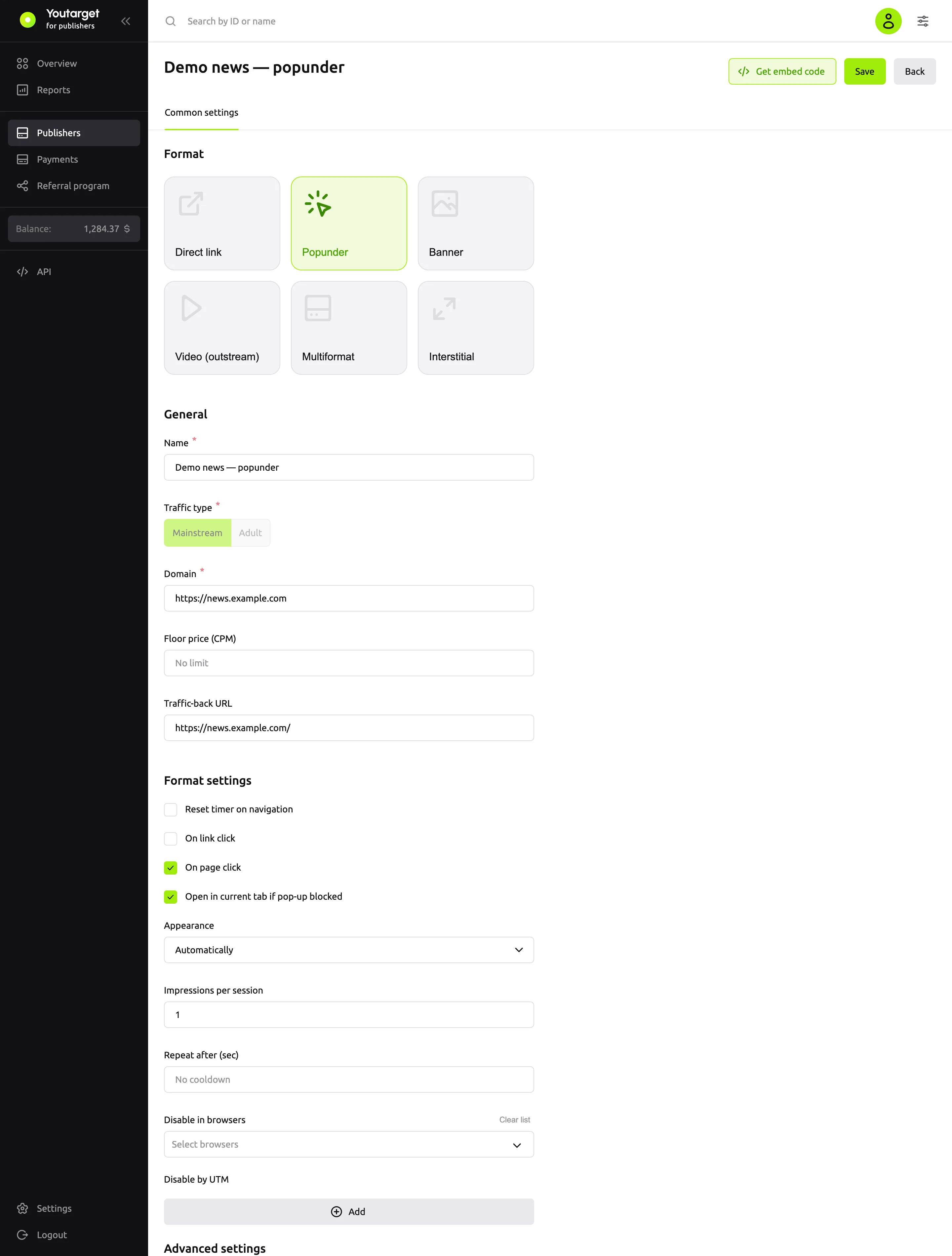
| Field | Default | What it does |
|---|---|---|
| Appearance | Automatically | How to open the ad: Automatically, In the previous tab or In the current tab. See below |
| Impressions per session | 1 | How many times to show the popunder to one visitor per session. 0 means no limit |
| Repeat after (sec) | empty | The pause between impressions. Empty means no pause |
| Reset timer on navigation | off | If on, the pause resets when the visitor goes to another page of your site |
| Trigger event | Click | Click or Pointerdown. Pointerdown fires earlier, but with On page click it can fire on scrolling |
| On page click | on | Opens on a click anywhere on the page |
| On link click | off | Opens on a click on any link |
| On element click (CSS selector) | empty | Opens on a click on specific elements, for example .download-button |
| Disable in browsers | empty | Does not show in the selected browsers: Chrome, Firefox, Safari, Edge, Opera, Yandex |
| Disable by UTM | empty | Does not show to visitors with the given UTM tag, for example utm_source = yandex |
| Open in current tab if pop-up blocked | on | If the browser blocked the new window, opens the ad in the current tab |
| Floor price (CPM) | empty | The minimum price per 1,000 impressions in US dollars |
| Traffic-back URL | empty | Where to send the visitor if there is no ad |
Trigger event and On element click (CSS selector) are in the Advanced settings group at the bottom of the form.
A session lasts while the browser tab is open. The impression counter and the pause are stored in the visitor's browser.
Appearance
| Value | What happens |
|---|---|
| Automatically | The code picks the method based on the browser: "in the current tab" in Chrome, Edge, Opera, Yandex Browser and Safari, "in the previous tab" in Firefox and other browsers |
| In the previous tab | A classic popunder: the ad opens in a new window behind the current one |
| In the current tab | Your site opens in a new tab, and the ad opens in the current one |
Events
To find out whether the popunder was shown, subscribe to events. You can place the call before or after the embed code.
<script>
ytrgt('pop:on', 'show', function (data) { console.log('Popunder shown', data.url); });
ytrgt('pop:on', 'blocked', function (data) { console.log('Not shown', data.reason); });
</script>| Event | When | Data |
|---|---|---|
show | The popunder opened | url, appearance |
blocked | The popunder was not shown | reason: frequency means the per-session limit, cooldown means the pause has not passed, disabled-utm and disabled-browser mean it is turned off by the settings, popup-blocked means the browser blocked the window |
error | An error | The error object |
Which ads are shown
Pop campaigns.