
Run ads around sports events
Goal
Run ads only around matches, races or fights: a few hours before the start, during the event and after it. For example, advertise food delivery during Premier League matches. Or the other way round: pause the campaign while an event is on.
The dashboard turns the campaign on and pauses it by itself, following the event schedule. You do not need to watch the calendar or start the campaign by hand.
Before you start
- A campaign. To create one, see Your first campaign in 15 minutes.
- The sports, leagues or specific matches you want to run ads around.
Steps
Open the campaign and go to the Live targeting tab. If you do not see the tab, click More: it holds the tabs that do not fit in the row.
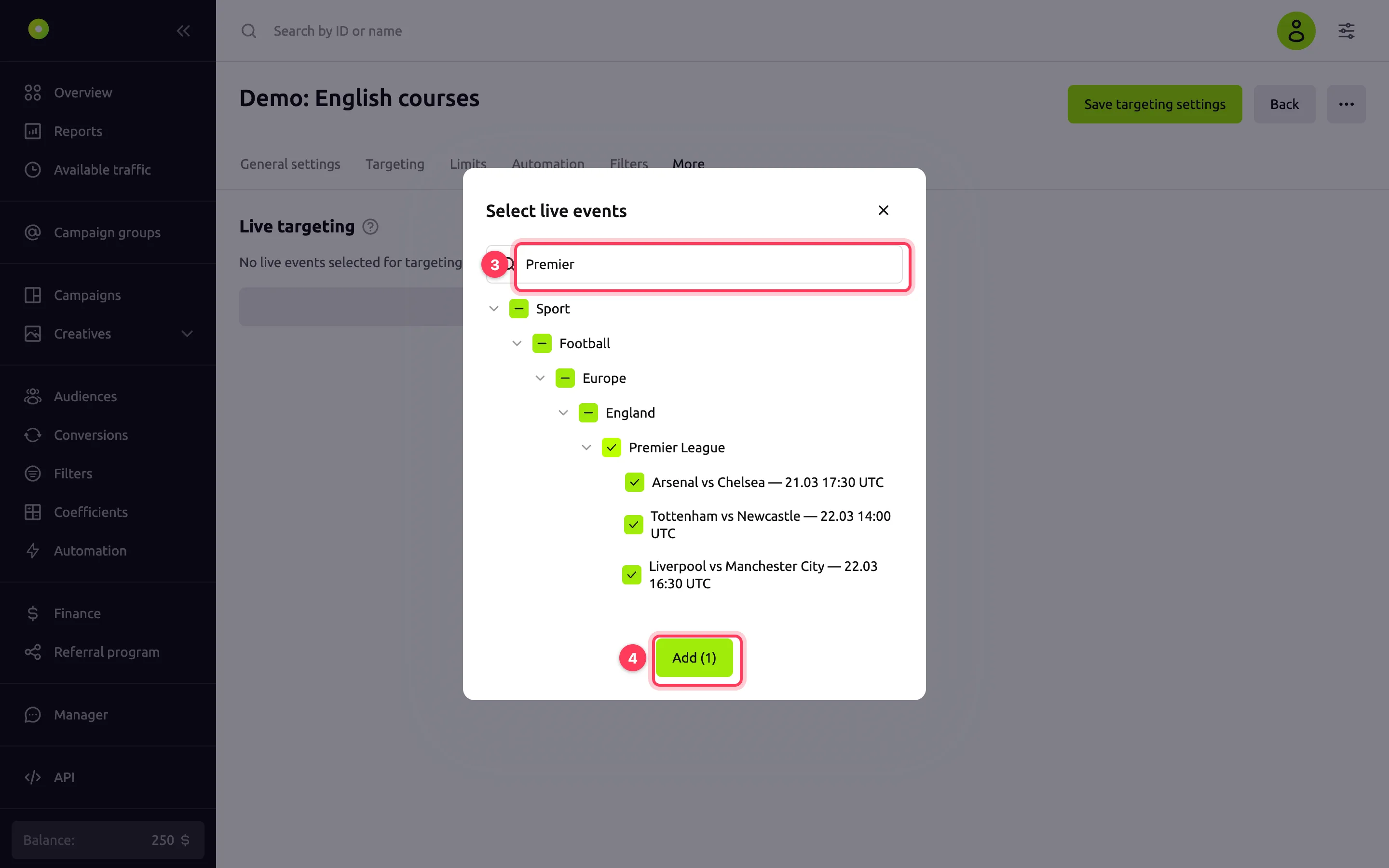
Click Add event. The Select live events window opens.
Find events with the search or in the tree and select:
- a group (a sport, a country or a league) to run the campaign on all of its events;
- individual events: specific matches, Grand Prix sessions or fights.
For how the tree is organized, see Which events you can select.
Click Add (N), where N is the number of selected groups and events. The tab shows a card for each group and each event.
In each card, select the mode:
- Include: run the campaign during the event hours;
- Exclude: pause the campaign during the event hours.
Set the event hours:
- Hours before start: how many hours before the event starts the mode takes effect;
- Hours after end: how many hours after the event ends the mode stays in effect;
- Run during the event: whether the mode also applies during the event itself. Selected by default.
The fields take 0 to 720 hours, fractions allowed. For how they add up, see How the event hours are calculated.
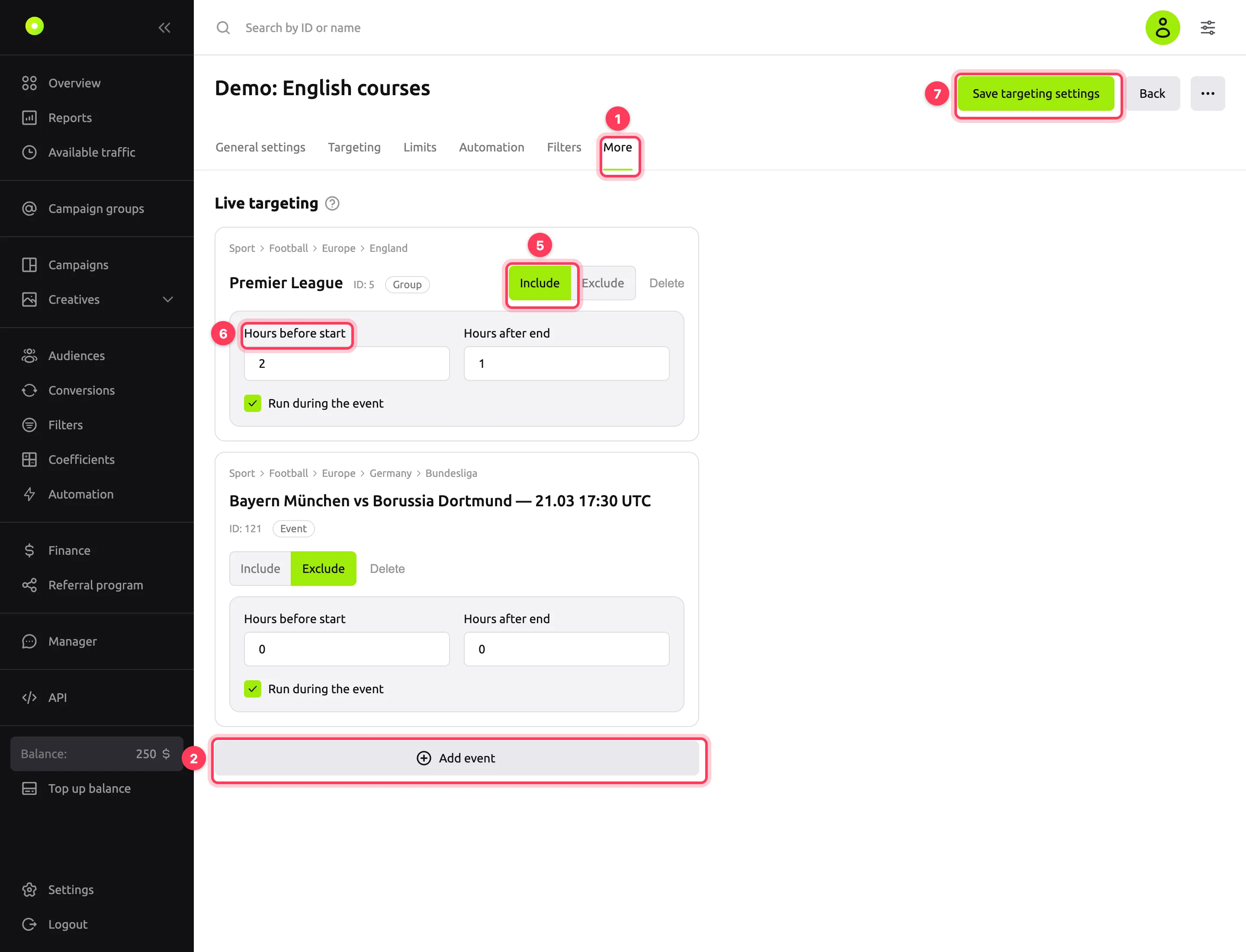
Click Save targeting settings.
To remove an event, click Delete in its card and save the settings.
Which events you can select
The list currently has sports events only: football, basketball, baseball, hockey, handball, volleyball, rugby, American football (NFL), Australian football (AFL), NBA, Formula 1 and MMA.
The tree starts with the Sport group, with the sports under it. The levels below depend on the sport:
| Sport | Tree levels |
|---|---|
| Football, basketball, baseball, hockey, handball, volleyball, rugby | Continent → country → league → match |
| NFL, AFL, NBA | League → match |
| Formula 1 | Grand Prix → session |
| MMA | Fight |
- Event names include the start time in UTC, for example "Arsenal vs Chelsea — 21.03 17:30 UTC".
- Events appear about a week before they start. Finished events disappear from the list.
- A group includes future events. If you select a group, such as a league, the campaign also runs on matches added to it later. New events are picked up within a day.
- One event, one card. You can add an event or a group to a campaign only once, and the selection window hides the ones you have already added. If you add a group that contains an event already in the campaign, the event card is replaced with a group card with default settings.
How the event hours are calculated
Events have no exact end time, so the dashboard estimates it: the start plus 2 hours, or plus 45 minutes for MMA. Hours after end count from this time.
| Run during the event checkbox | When the mode applies |
|---|---|
| Selected | As one period: from "start minus hours before" to "end plus hours after" |
| Cleared | As two periods: the hours before the start and the hours after the end. The mode does not apply during the event itself |
Example: a match starts at 17:30 UTC, Hours before start is 2, Hours after end is 1, and the checkbox is selected. The dashboard counts the match as ending at 19:30 UTC. The mode applies from 15:30 to 20:30 UTC.
The hours before the start take effect no earlier than the event appears in the list, about a week in advance. So there is no point in setting Hours before start above 168.
If the checkbox is cleared, at least one of the hour fields must be greater than zero.
How events combine with other settings
- Several events with Include. The campaign runs during the hours of at least one of them.
- Exclude beats Include. During the hours of an event with Exclude, the campaign is paused, even if the hours of an event with Include are on at the same time.
- Only events with Exclude. Outside their hours, the campaign runs as usual, according to its other settings.
- An event with Include, but no upcoming events. The campaign stays paused until the hours of the next event. This happens when all selected matches are over or the league is in its off-season.
- Other conditions must also be met. Live targeting works together with the balance, the Launch period and the Scheduler on the Limits tab. The campaign runs only when all conditions are met.
- Campaign copy. Events are not copied: set them again in the copy.
The dashboard checks the event hours every minute. The campaign status stays Active. Only the dot next to the name changes: green means ads are running, gray means the campaign is paused by the system. If you stopped the campaign yourself, live targeting does not start it.
Result
The "Changes successfully saved" message appears, and the tab shows cards for the selected events. During the hours of events with Include, the dot next to the campaign name is green, and the rest of the time it is gray.
Troubleshooting
| Symptom | Cause | Fix |
|---|---|---|
| The campaign is not running, the dot is gray | The campaign has events with Include, but the hours of none of them are on now | Check the event hours in How the event hours are calculated or add upcoming events. For other checks, see No impressions |
| The campaign is paused during the hours of an event with Include | The hours of an event with Exclude are on at the same time, or another condition is not met: balance, launch period, scheduler | Check the events with Exclude and the Limits tab |
| A card has the red "Event finished" tag | The event is over | Click Delete in the card and save the settings |
| Saving fails with "Live event not found or hidden" | The campaign still has an event that is no longer in the list | Delete the cards with the "Event finished" tag and save again |
| Error "A target must either run during the event or have a non-zero minutes_before/minutes_after" | Run during the event is cleared and both hour fields are 0 | Select the checkbox or set the hours before the start or after the end |
| The match you need is not in the selection window | The match starts more than a week from now, is already over, or is already in the campaign, on its own or as part of a group | Select a group, such as the league: the match is picked up when it appears in the list |
| The number in an hour field changed by itself | You entered less than 0 or more than 720 | Enter a value from 0 to 720 |
| There is no Add event button, and the save button is disabled | You do not have permission to edit the campaign: for example, the agency did not give you permission to edit campaigns | Contact the agency that gave you access |
| Error "Live-event targets cannot be edited for an archived campaign." | The campaign is archived | Restore the campaign from the archive as described in Manage the campaign list |
Next steps
- Limit budget and impression frequency: the launch period and scheduler work together with live targeting.
- All campaign tabs.