
Bid optimization
Optimization is a mode in which the platform picks the campaign bid and you set the goal: the price per 1000 viewable impressions, per conversion or per click. Choose the optimization in the Finances block in the Optimization field, and the goal in the Target value field. A campaign can have only one optimization.
Available optimizations
| Optimization | What the Target value sets | Available for | What you pay for |
|---|---|---|---|
| vCPM optimization | The price per 1000 viewable impressions, vCPMThe price per 1000 viewable impressions. | CPM model, Native, banner and video formats | Every 1000 impressions bought, at the Price |
| CPA optimization | The price per conversionA target user action after an ad click: a purchase, a lead, a sign-up., CPAThe cost of one conversion. | CPM and CPC models, all formats | As in the payment model, but the price changes by zoneA specific ad slot on a site or in an app, for example a block on a site page.: the charge can be higher or lower than the Price |
| Target CPC | The price per click | CPM model, Native, banner and video formats. Enabled for each account separately | Every 1000 impressions at the bid the platform picked, no higher than the Price |
With the SMART CPM model there is no Optimization field: the platform already manages the bid. If Target CPC is not in the list and you need it, contact your manager. For how payment models differ, see Payment models.
What the Optimization list contains
The set of optimizations depends on the campaign format and payment model. The first item in the list is always No optimization.
| Format | Payment model | Optimizations in the list |
|---|---|---|
| Native | CPM | vCPM optimization, CPA optimization, Target CPC¹ |
| Native | CPC | CPA optimization |
| Banner | CPM | vCPM optimization, CPA optimization, Target CPC¹ |
| Banner | SMART CPM | No Optimization field |
| Video | CPM | vCPM optimization, CPA optimization, Target CPC¹ |
| Video | SMART CPM | No Optimization field |
| Push | CPC | CPA optimization |
| Pop | CPM | CPA optimization |
| Pop | SMART CPM | No Optimization field |
¹ Only if Target CPC is enabled for the account.
The payment model and format do not change after the campaign is created. If the optimization you need is not in the list, create a new campaign with a suitable payment model.
vCPM optimization
How it works. The campaign bids its Price per impression, as in regular CPM. Before buying, the platform estimates how likely the impression is to be viewable and buys it only if, at that probability, 1000 viewable impressions cost no more than the Target value.
Example: the Price is $0.80, the Target value is $1.60. The campaign takes impressions that become viewable with a probability of about 50% or higher.
As the campaign runs, the platform compares the actual vCPM with the target. If the actual value is higher than the target, impression selection becomes stricter; if lower, looser. At the start of the campaign, while there are few impressions, the platform selects them by the viewability estimate only. The campaign does not buy impressions whose viewability cannot be estimated.
What you pay for. Every 1000 impressions bought, at the Price, including impressions that did not become viewable. See the actual vCPM in reports: the vCPM metric is spend per 1000 viewable impressions. For details, see the Reports reference.
Where it is unavailable. Pop has no viewable impression, so this format has no vCPM optimization.
Set the Target value above the Price. The dashboard does not check this, but vCPM cannot be lower than the price per 1000 impressions: there are never more viewable impressions than impressions bought.
CPA optimization
How it works. The platform rates each zone's performance by conversions and multiplies the campaign price by the zone coefficient. In zones with good results the bid is higher, and the campaign wins the auction more often. In weak zones the bid is lower. Until a zone is rated, the bid in it equals the Price.
The Target value is what one conversion is worth to you. The platform uses this value to judge which zones pay off. The Receive conversion cost from postback toggle appears under the Target value. Turn it on if your tracker sends a payout for each conversion: the platform then judges zones by the payouts from the postbackA server notification about a conversion that a tracker sends to the platform. instead of the Target value.
What you pay for. As in the payment model: per 1000 impressions with CPM, per click with CPC. But the price in each zone is the Price multiplied by the zone coefficient. So the charge per impression or click can be both higher and lower than the campaign Price.
What you need in advance. Zones are rated by conversions, so first set up a postback and check that conversions appear on the Events tab.
Target CPC
How it works. You set the price per click. For each impression, the platform estimates the click probability and bids per 1000 impressions so that a click costs about the Target value on average.
Example: the Target value is $0.05, the expected CTRThe share of clicks in impressions, in percent. of the impression is 1%. The bid per 1000 impressions is 0.05 × 1% × 1000 = $0.50.
Once the campaign has collected clicks, the platform compares the actual cost per click with the target and adjusts the bids.
With Target CPC, the Price is the maximum bid per 1000 impressions. If the calculation gives more, the campaign bids the Price.
What you pay for. Every 1000 impressions at the bid the platform picked. It is no higher than the Price. You do not pay separately for clicks.
Access. Target CPC is enabled for each account separately. If access is later turned off, campaigns that already use Target CPC keep working with it, and you can still save their settings. But if you change the optimization in such a campaign, you cannot switch back to Target CPC.
Target value
- The field appears when an optimization is selected and is immediately filled with the minimum. The minimum is shown under the field: "Minimum price is …". The dashboard raises a value below the minimum to the minimum.
- The value is set in the account currency, with up to three decimal places.
- A campaign with optimization cannot be saved without a Target value.
- For vCPM optimization, the dashboard warns you if you enter more than $1 (RUB 10, €1) when creating a campaign, or more than double the value when editing. This is a prompt to check your input; you can save such a value.
How to turn on, change or turn off optimization
Open the campaign on the General settings tab or start creating a new one.
In the Finances block, choose an option in the Optimization field. The list depends on the format and payment model.
Enter the goal in the Target value field. For CPA optimization, turn on Receive conversion cost from postback if needed.
Click Save general settings.
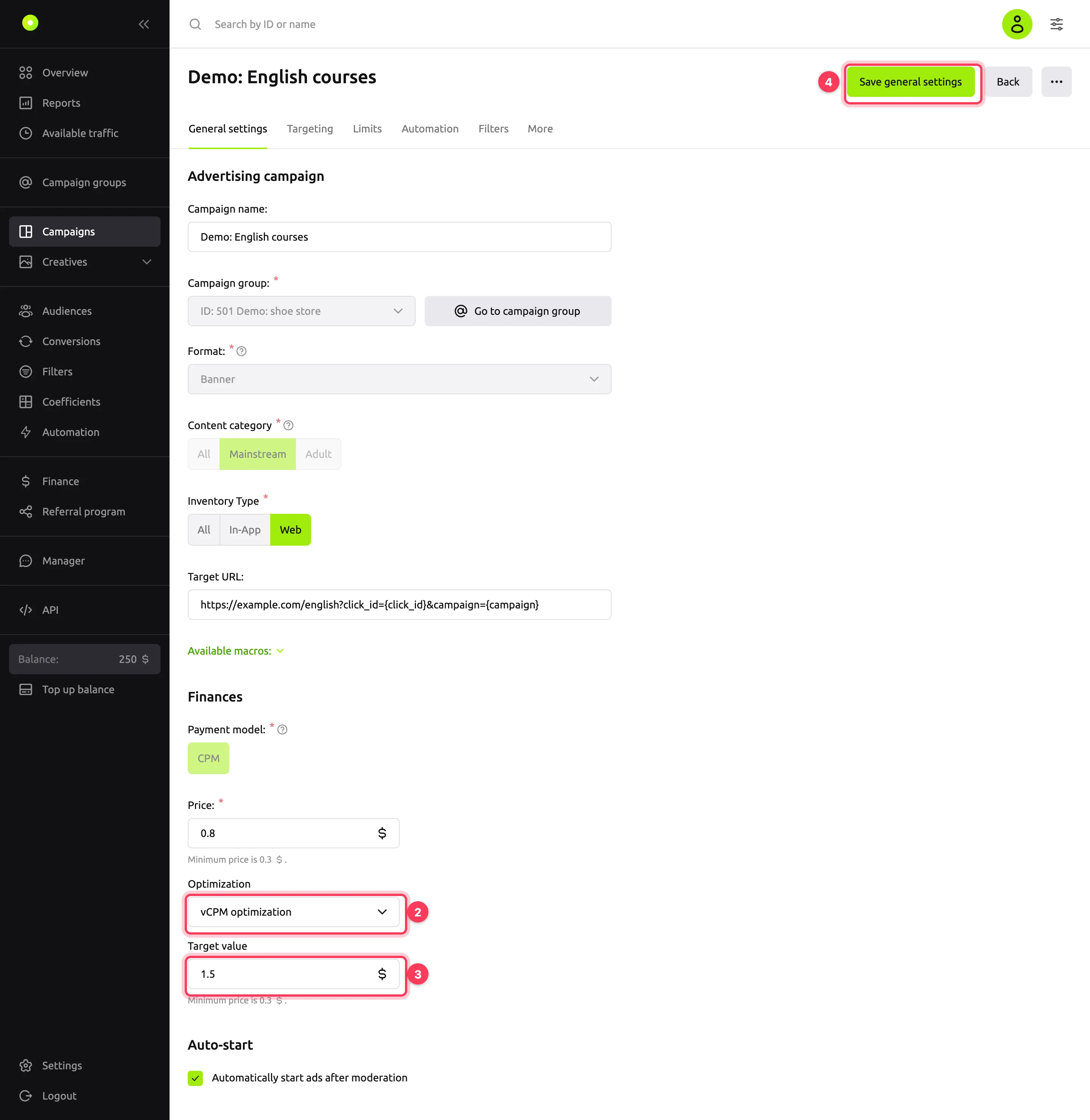
You can turn on, change or turn off optimization at any time, including in a running campaign. The payment model does not change after creation, so the set of optimizations available in the campaign stays the same.
- Change the optimization. Choose another one in the Optimization field. The Target value is replaced with the minimum: enter the new goal.
- Turn it off. Choose No optimization. The platform applies the Price and coefficients again. Coefficients reset when you turned optimization on do not come back, and automation rules that were turned off do not turn back on by themselves.
- When creating a campaign, the optimization is reset if you change the format. Switching to CPC removes vCPM optimization and Target CPC; choosing SMART CPM removes any optimization.
- A campaign copy keeps the optimization. If optimization is on in the copy, its coefficients are reset and the automation rules that change coefficients are turned off. An optimization unavailable to the copy owner's account is turned off in the copy. For details, see Copying a campaign.
What changes in the campaign after you turn it on
With any optimization the platform calculates the bid, and manual coefficients do not take part in it. So when you turn on optimization in a campaign that had none, the platform changes the following in the campaign:
Coefficients are reset. Selective coefficientsA multiplier of the campaign bid for a specific zone or site. of all zones and micro bidding coefficients go back to 100%.
The Coefficients section is locked. "Campaign optimization is enabled" appears above the table. Zone statistics are visible, but you cannot change zone coefficients and statuses, the Enable all sources and Reset all coefficients buttons are disabled, and there is no Upload CSV button. For more about this section, see Raise or lower the bid on specific placements.
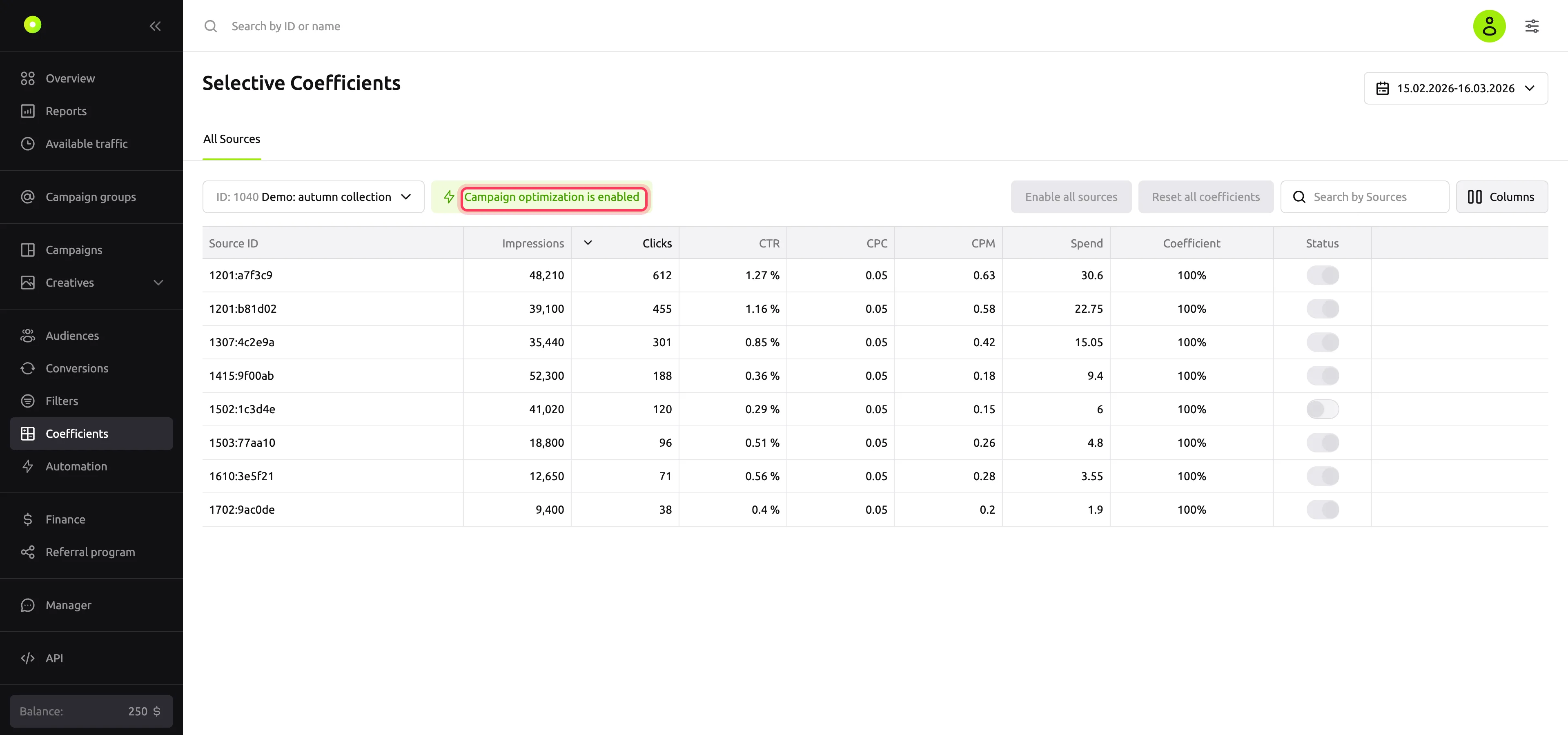
Disabled zones stay disabled. Zones you turned off in the Coefficients section before optimization are still not bought. You can turn them back on after you turn off optimization.
Micro bidding is unavailable. The micro bidding tab says: "Microbidding is unavailable because an optimization is enabled in the campaign settings."
Automation rules that change coefficients are turned off. These are the Selective Coefficient on Zone ID and Micro-bidding on … rules. While optimization is on, you cannot create or turn on such a rule. For details, see Set up automation rules.
Everything else works as usual: targeting, filters, limits and frequency capping, and automation rules that block zones, domains and apps, turn off a creative or stop a campaign. To keep the campaign from buying a zone under optimization, add the zone to a blacklist filter.
If you change one optimization to another, coefficients are not reset again: under optimization they are locked anyway.
How to choose
- You need reach with viewable impressions of banners, Native or video: choose vCPM optimization. The campaign will buy fewer impressions, but with better viewability.
- You pay for impressions, but your goal is clicks: choose Target CPC, if it is enabled for the account. If you want to pay only for the clicks themselves, choose the CPC model. For details, see Payment models.
- You have conversions and a target cost per conversion: choose CPA optimization after you set up a postback.
- You want to manage zone bids yourself or with rules: keep No optimization and use coefficients and automation.
Troubleshooting
| Symptom | Cause | Fix |
|---|---|---|
| Almost no impressions with vCPM optimization | The Target value equals the Price, is below it or only slightly above it. Only impressions that are almost certain to be viewable fit the campaign | Raise the Target value or lower the Price |
| Few impressions with Target CPC | A low Target value gives a low bid per 1000 impressions, and it loses the auction | Raise the Target value. For how the bid affects impressions, see Auction and bid |
| With Target CPC, clicks are cheaper than the target, but impressions are few | The bid hits the Price: it is lower than the calculated bid | Raise the Price |
| The cost per click in the report differs from the Target value | The bid is calculated from the expected click probability. The platform adjusts it by actual clicks once they accumulate | Let the campaign collect clicks and compare the cost per click over several days |
| With CPA optimization, the charge is higher than the Price | The platform raises the bid in high-performing zones | This is how it should work. To cap spend, set limits. For other causes, see Spend is not what you expected |
| Target CPC is not in the list | It is not enabled for the account, the payment model is not CPM, or the format is Push or Pop | Contact your manager for access. The payment model does not change after creation: create a new campaign |
| vCPM optimization is not in the list | The format is Pop or the payment model is not CPM | Only CPA optimization is available for Pop |
| No Optimization field | The payment model is SMART CPM | The platform already manages the bid. If you need optimization, create a campaign with the CPM model |
| "Campaign optimization is enabled" in the Coefficients section, coefficients cannot be changed | Optimization is on | Exclude zones with a filter or turn off optimization |
| "Coefficient automated rules are not available while bid optimization is enabled" | The rule changes coefficients, and optimization is on in the campaign | Choose an action without a coefficient or turn off optimization |