
Postback for Keitaro
Goal
Send conversions from Keitaro to the platform: Keitaro gets the click ID from the campaign link and returns it in a postbackA server notification about a conversion that a tracker sends to the platform. together with the conversion revenue.
This is a special case of the general guide Set up postback and conversion tracking. This page covers only what differs for Keitaro.
Before you start
- A Keitaro campaign and its link: the address where Keitaro accepts clicks.
- A traffic source in Keitaro for Youtarget traffic.
- A campaign in the dashboard. To create one, see Your first campaign in 15 minutes.
Steps
In the left menu, open Conversions, go to the Integrations tab and click Create integration.
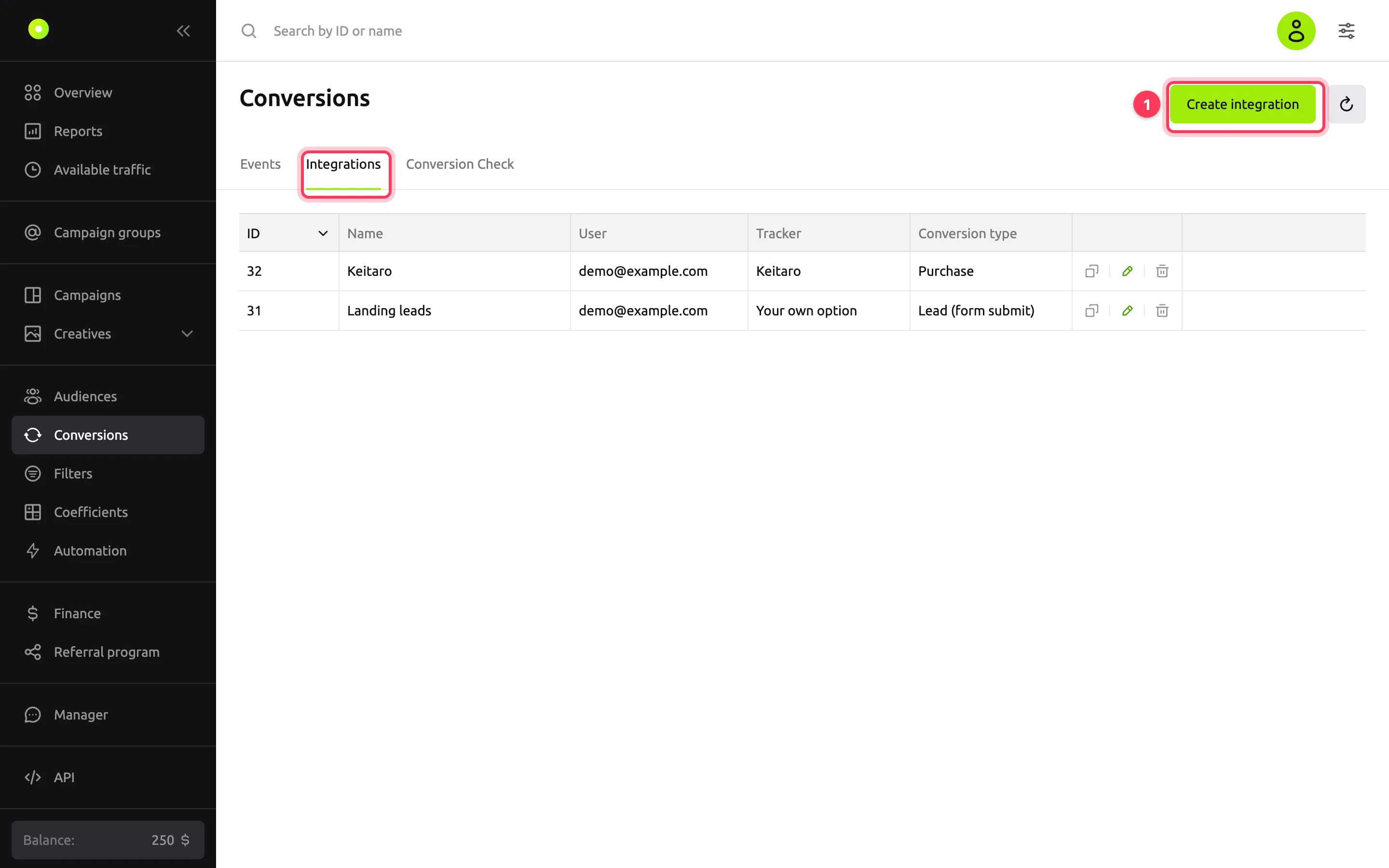
In the Tracker field, select Keitaro. The dashboard fills the fields with Keitaro macros: Click ID gets
{external_id}, Conversion payout gets{conversion_revenue}. You cannot edit these fields while the template is selected.In the Name field, replace the default "Keitaro" with a name that makes sense to you, for example "Keitaro: purchases". Up to 20 characters.
In the Conversion currency field, select USD or RUB: the currency in which Keitaro sends the conversion revenue. The dashboard writes it into the postback link as is. The link has one currency for all conversions: if Keitaro has payouts in different currencies, the platform still counts them in the selected one.
In the Conversion type field, select the event, for example Purchase. For details on the conversion type and Accept duplicate conversions, see the general guide.
Click Create integration.
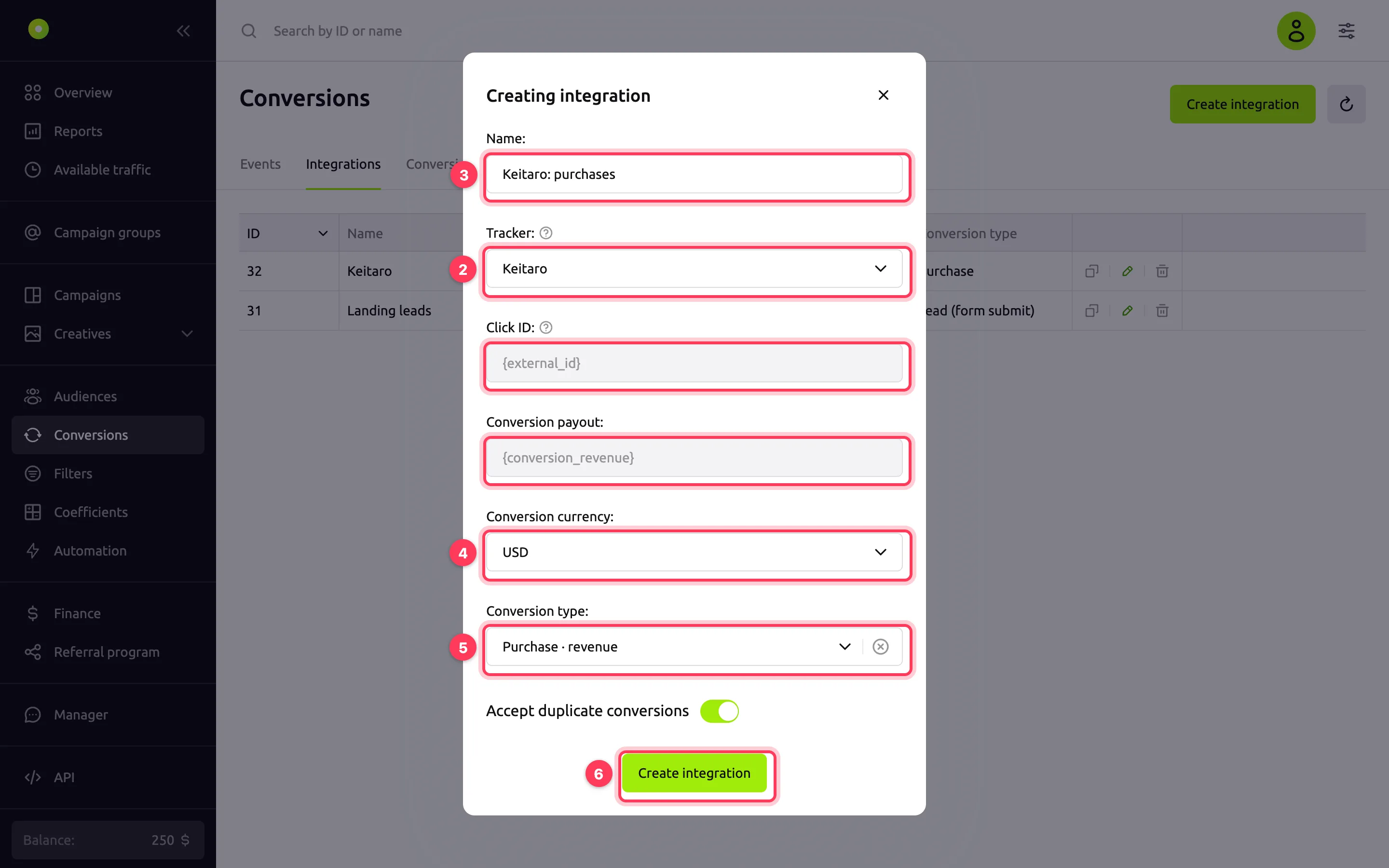
In the Integration code window, click Copy and exit. The postback link is copied to the clipboard.
In Keitaro, open the settings of the Youtarget traffic source and specify which link parameter carries the external click ID: Keitaro puts it into the
{external_id}macro. For example, theexternal_idparameter.In the same source settings, paste the copied link as the postback. Paste the whole link and do not change the
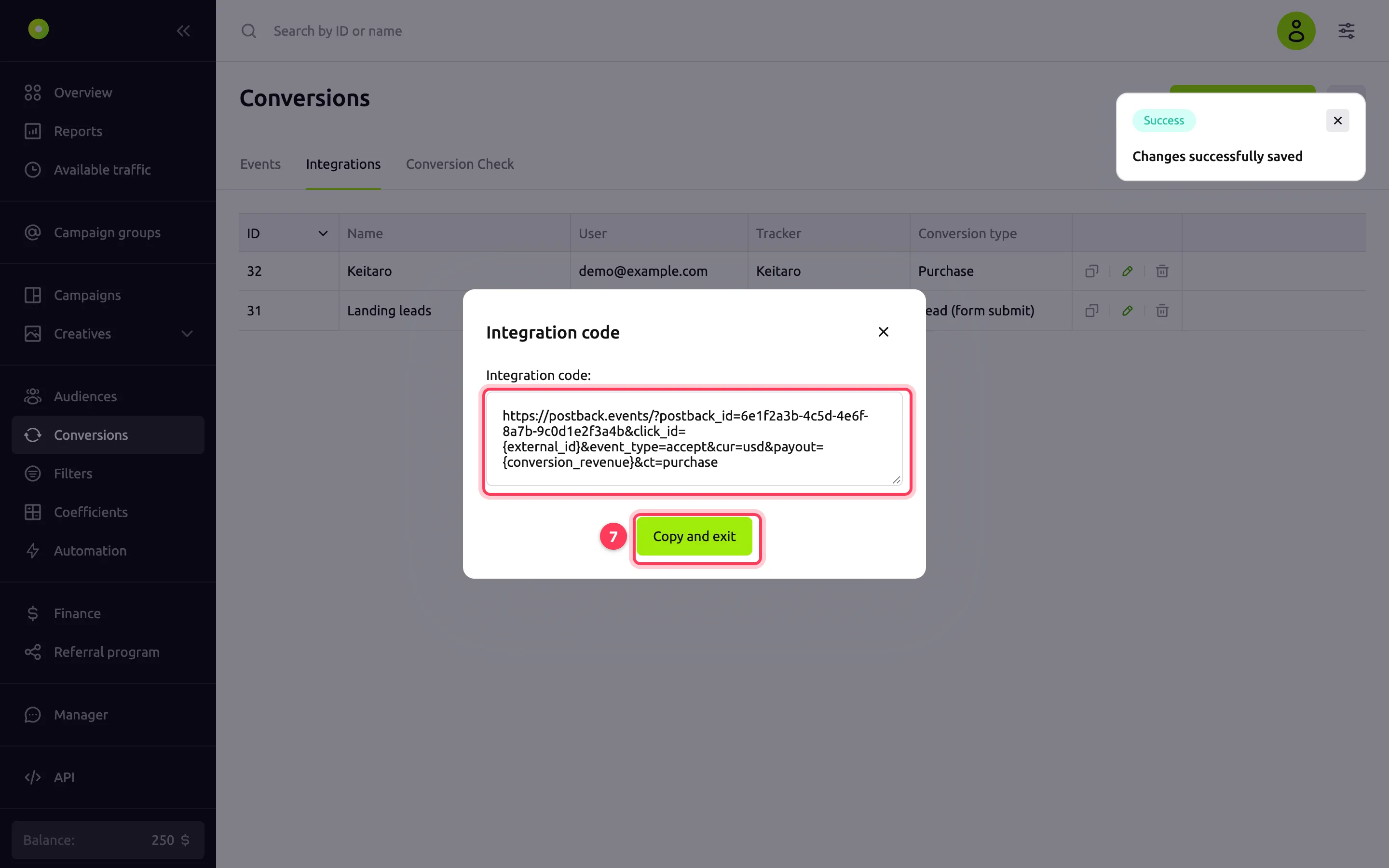
{external_id}and{conversion_revenue}macros: Keitaro replaces them.In the dashboard, open the campaign and paste the Keitaro campaign link with the parameter from step 8 and the
{click_id}macro into the Target URL field. For example:https://tracker.example.com/r7Kq2m?external_id={click_id}.
Click Save general settings.
If the link is set in the creative rather than in the campaign, add the parameter with {click_id} to the creative's Target URL (Landing page for banner and video creatives).
Result
The chain works like this. On a click, the platform puts the click ID into {click_id}, and Keitaro stores it as external_id. When a conversion appears in Keitaro, Keitaro sends a postback and puts this ID in place of {external_id}.
The postback link for Keitaro looks like this:
https://postback.events/?postback_id=<integration id>&click_id={external_id}&event_type=accept&cur=usd&payout={conversion_revenue}&ct=purchase| Parameter | Value in the link | Where it comes from |
|---|---|---|
postback_id | Integration ID | The dashboard. Do not change it |
click_id | {external_id} | Keitaro template. Keitaro puts in the click ID it got from {click_id} |
payout | {conversion_revenue} | Keitaro template. Keitaro puts in the conversion revenue |
cur | usd or rub | The Conversion currency field |
event_type | accept | The dashboard. Does not affect tracking. For details, see Conversions are not coming in |
ct | Conversion type key, for example purchase | The Conversion type field. If no type is selected, the parameter is absent |
Test the setup with a test conversion: on the Conversion Check tab, select a campaign and a creative, open the link and complete the target action on the site. The conversion appears on the Events tab with the integration name and the payout from Keitaro. To learn when to expect the conversion and how to read the platform's response in the Keitaro log, see Conversions are not coming in.
NOTE
The platform counts every conversion it receives as approved. Set up Keitaro to send the postback only for approved conversions.
Troubleshooting
| Symptom | Cause | Fix |
|---|---|---|
The Keitaro log shows the response invalid uuid format | Keitaro did not get the click ID: the Target URL has no parameter with {click_id}, or the parameter name does not match the source settings | Compare the parameter name in the Target URL and in the Keitaro source settings |
The Keitaro log shows the response invalid payout | Keitaro did not put in the revenue: {conversion_revenue} arrived empty or unreplaced | Check that the conversion in Keitaro has revenue. Details: Conversions are not coming in |
| The Click ID and Conversion payout fields cannot be edited | The Keitaro template is selected: the macros come from the template | To enter other macros, select Your own option in the Tracker field |
| You changed the currency or conversion type in the integration, but the platform still receives the old values | The currency and conversion type are written into the postback link itself. Keitaro still has the old link | After you save the integration, the dashboard shows the Integration code window again. Copy the new link and replace it in Keitaro |
| The dashboard shows conversions that Keitaro rejected | The platform counts every postback it receives as approved | In Keitaro, turn off the postback for rejected and pending conversions |
Next steps
- To optimize the campaign by CPA and take the conversion cost from the postback, see "Next steps" in the general guide.
- The same setup for Binom: Postback for Binom.
- If conversions did not appear: Conversions are not coming in.