
Pop creatives
A PopA format that opens the landing page in a new tab or window. creative is a link to a landing page. On impression, the page opens for the user in a new tab or window, so the creative has no text or images. You create a creative in Creatives → Pop with the Add creative button and attach it to a Pop campaign.
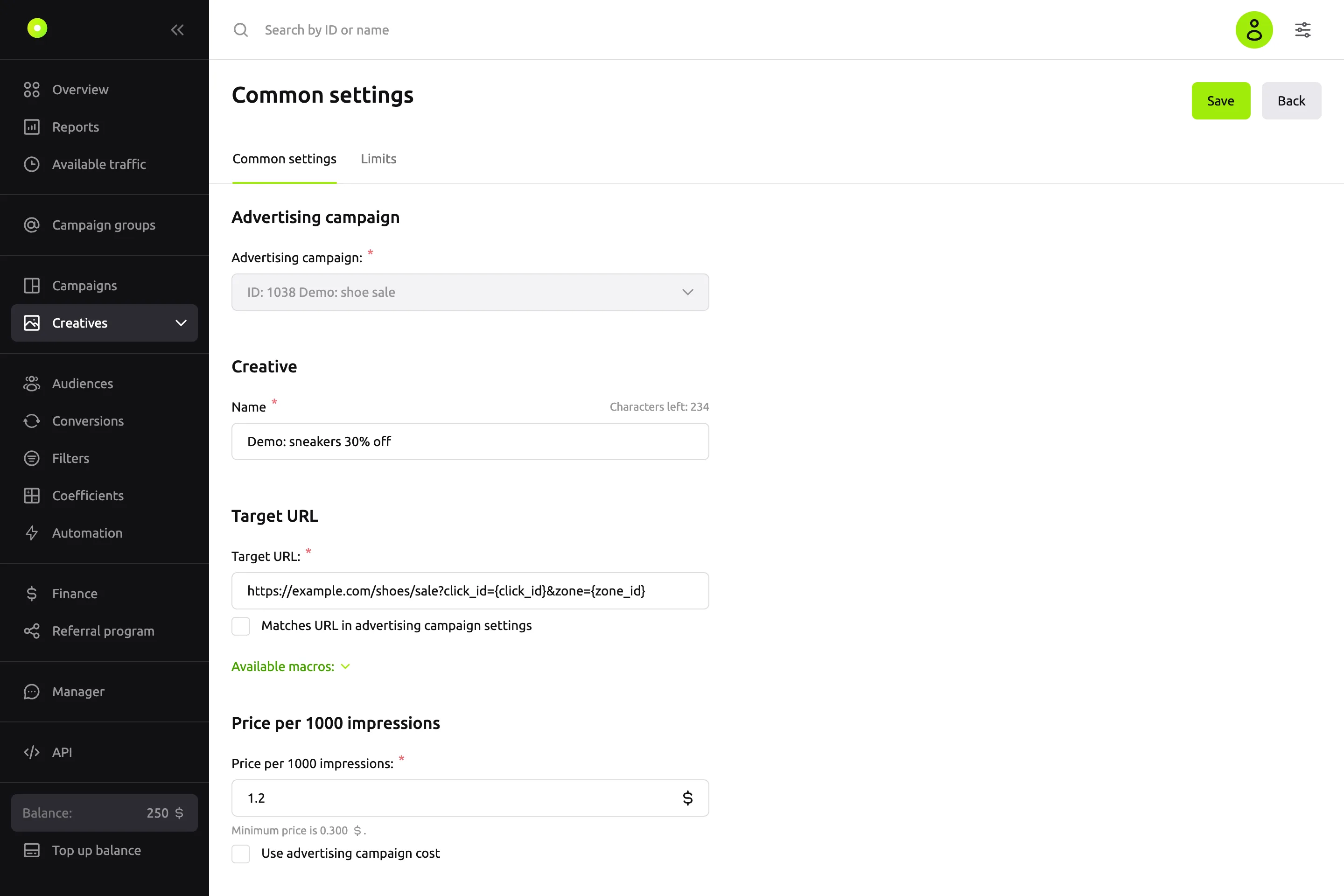
Fields
| Field | What it means | Values and limits |
|---|---|---|
| Advertising campaign: | The Pop campaign the creative will run in | The list shows only Pop campaigns. You cannot change the campaign after saving |
| Name | The creative name in lists and reports. The user does not see it | Required, up to 256 characters |
| Target URL: | The address of the page that opens on impression | Required, a full URL with http:// or https://. You can leave it empty if Matches URL in advertising campaign settings is selected |
| Price per 1000 impressions: | How much you pay for 1,000 impressions of this creative. In a SMART CPM campaign the field is called Maximum price per 1000 impressions: | Not lower than the minimum price. You can leave it empty if Use advertising campaign cost is selected |
Target URL
If you select Matches URL in advertising campaign settings, the creative takes its link from the campaign's Target URL field, and the Target URL: field is locked. The checkbox is unavailable if the campaign has no target URL: "Campaign not selected or Target URL not specified."
When the campaign target URL changes, creatives with this checkbox get the new link. If you clear the target URL in the campaign, these creatives stop, and their checkbox is cleared.
Under the field is the Available macros list: clicking a macro inserts it into the link. For macro values, see the Macros reference. In Pop, the {cpc} macro passes the price of one impression.
To replace part of the link in several creatives at once, use the Pop creative list. See Change the price and URL and copy creatives in bulk.
Price per 1,000 impressions
Pop campaigns are paid per impression: CPMThe price per thousand impressions. or SMART CPMPayment per 1000 impressions in which the platform picks the bid up to a set maximum.. An impression is the opening of the landing page. The minimum price depends on the campaign payment model and is shown under the field: "Minimum price is …".
If you select Use advertising campaign cost, the field is locked and the creative uses the campaign price. Without the checkbox, the creative has its own price.
The dashboard warns you, but still lets you save, if you enter more than $1 (RUB 10, €1) when creating a creative or raise the price more than twofold when editing it. For more, see Payment models.
You can also change the price in the Pop creative list: right in a Price column cell, or for several creatives at once. See Change the price and URL and copy creatives in bulk.
Traffic type
The Pop creative list has a Traffic type column. The creative form has no such field: the column shows the campaign's Content category: Mainstream, Adult or All. You choose the category when you create the campaign, and you cannot change it later. It is shared by all creatives in the campaign. For more about campaign fields, see the Campaign settings reference.
Saving and moderation
A new creative has two buttons: Save opens the saved creative, Save and add another opens an empty form with the same campaign.
A new creative goes to the Moderation tab. Once approved, it becomes active if Automatically start ads after moderation is selected in the campaign; otherwise it is stopped.
An edit in the form sends the creative back to moderation if you changed:
- the name;
- the part of the link after the domain: protocol, path, parameters or anchor;
- the Matches URL in advertising campaign settings checkbox.
Changing the price, the Use advertising campaign cost checkbox or only the domain in the link does not send the creative to moderation.
For what each status means, see Campaign and creative statuses. For how the review works and which pages do not pass moderation, see Creative moderation and Creative and landing page requirements.
The Limits tab
A saved creative has a Limits tab. It has the Budget and Clicks groups. Each group is turned on with a switch and contains a total, daily and hourly limit: Total:, Per day:, Per hour:. You do not have to fill in all three. A Pop creative has no impression limit.
- Budget: an amount greater than 0. Clicks: a whole number from 1.
- If you turn off a group's switch, its values are cleared.
- To save the changes, click Save limit settings.
When a limit is used up, the creative stops serving, and its status does not change. A creative that used up its daily or hourly limit serves again the next day or hour. Days and hours are counted in UTC: a new day starts at 00:00 UTC. To see how much is used up, go to the Pop creative list and hover over the speedometer icon in the creative's row. Campaign limits are described in Limit budget and impression frequency.
A Pop creative has no Pixels tab.
Errors on saving
| Message | What to do |
|---|---|
| "Specify the Target URL or select the checkbox below the field." | Enter a link or select Matches URL in advertising campaign settings |
| "Specify the price per 1000 impressions or select the checkbox below the field." | Enter a price or select Use advertising campaign cost |
| "Daily limit for creating creatives reached" | Create the creative the next day or contact your manager |
Related pages
- Your first campaign in 15 minutes: a Pop campaign and a creative from start to launch.
- Macros: what goes into the link.
- Change the price and URL and copy creatives in bulk.
- Campaign and creative statuses.