
Choose a bid with Available traffic
Goal
Before you launch a campaign, find out which countries have enough traffic in your format and what price to set. The Available traffic section shows impression volume by country and the average bid.
Before you start
- A clear idea of the future campaign: format, countries, devices and connection type.
- Access to reports: without it, the section does not open.
Steps
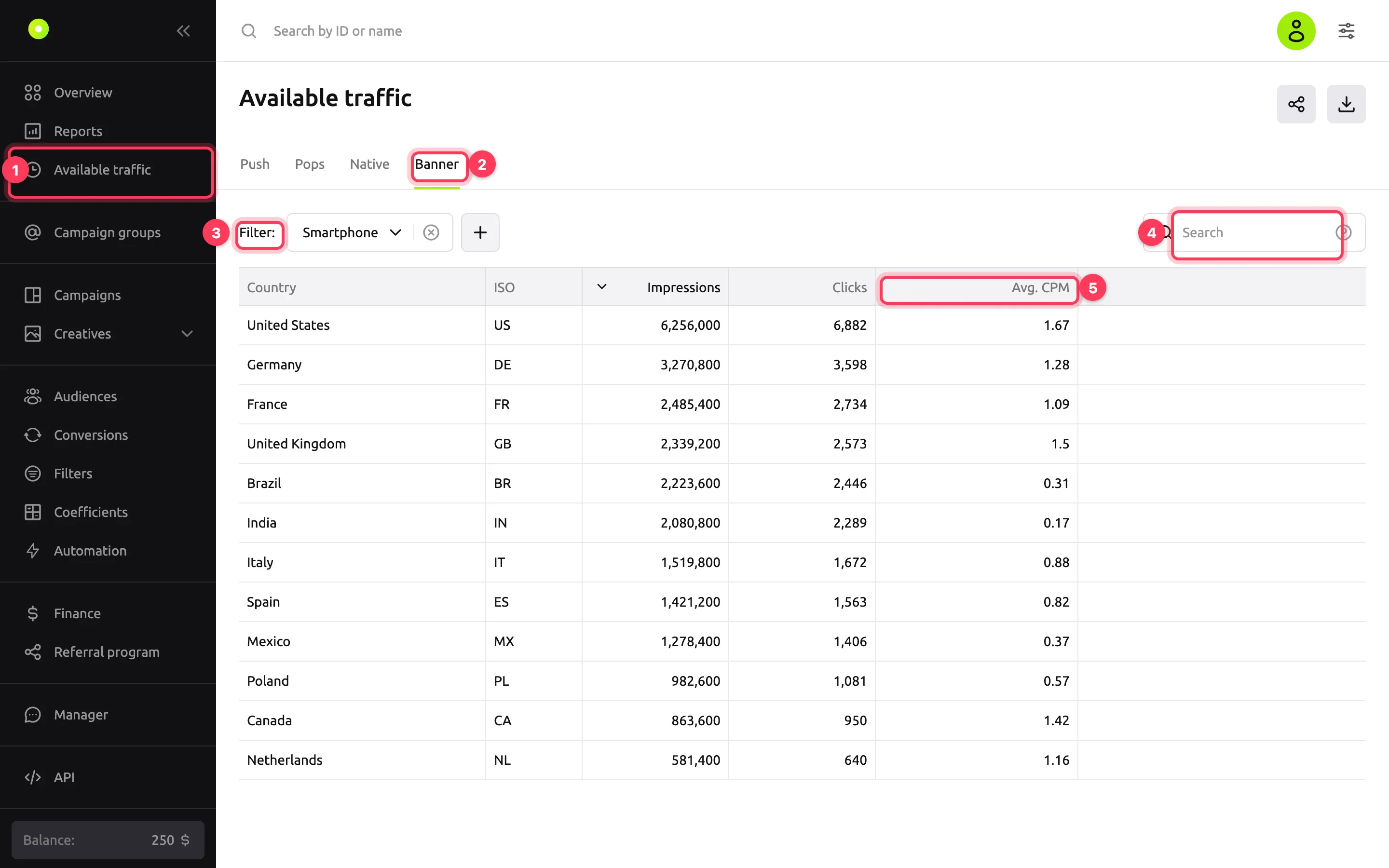
In the left menu, open Available traffic.
Select the format tab: Push, Pops, Native or Banner. The Push and Pops tabs are visible if the account has access to these formats.
Next to Filter:, click + and select the same parameters as in the future campaign: Traffic Type (Mainstream or Adult), Device Type, Connection Type. To remove a filter, click the cross next to it.
To find a country, type its name or ISO code in the Search field.
Compare countries by the Impressions, Clicks and Avg. CPM columns. Click a column header to sort by it.
Result
The table lists the countries that have traffic matching your parameters, with volume and average bid.
What the columns mean
| Column | What it shows |
|---|---|
| Impressions | Average number of impressions available per day in the country: the average daily number of ad requests over the last 7 days, with filters applied |
| Clicks | Estimated clicks per day: impressions multiplied by the average CTR of the format. The Pops tab has no such column |
| Avg. CPM / Avg. CPC | Reference average bid in the country for the format. It does not depend on the Traffic Type, Device Type and Connection Type filters. For banners and Pop, per 1,000 impressions; for native ads and Push, per click. The currency is the one selected in View settings |
"No data" in a cell means the value for the country has not been calculated. Filters in the table are for estimates only and do not affect campaigns.
How to apply the results to a campaign
- Select the countries with enough volume in the Geography of displays block on the campaign's Targeting tab. Set devices and connection type there too, the same as in the section filters. Learn more in Set up campaign targeting.
- In the Finances block, set a price no lower than the average bid in the selected countries. With a price below average, the campaign loses the auction more often and gets fewer impressions.
- If average bids in the selected countries differ a lot, move the expensive countries to a separate campaign with its own price.
To export the table to CSV or XLSX, click the down-arrow button in the top-right corner. The button next to it copies a link to the section with the current filters, so you can send it to a colleague.
Troubleshooting
| Symptom | Cause | Fix |
|---|---|---|
| "No data matching the conditions" | There is no traffic for this combination of filters | Remove some filters or select another format |
| No Push or Pops tab | The account has no access to this format | Contact your manager |
| The campaign gets fewer impressions than the Impressions column shows | The column shows all available traffic, which all advertisers share. Volume depends on price, limits, frequency and schedule | Raise the price and check limits as described in Auction and bid |
Next steps
- Set up campaign targeting.
- Auction and bid: what decides whether a bid wins.