
Campaign groups
A campaign groupA folder for one advertiser's campaigns with shared settings and limits. brings campaigns together, for example campaigns for one product or one agency client. A group has a name and its own budget, click and impression limits that apply to all its campaigns.
Each campaign belongs to one group. You choose the group when you create a campaign and cannot change it later: to move a campaign, copy it to another group. You cannot delete a group in the dashboard.
Group list
To open the list, click Campaign groups in the left menu.
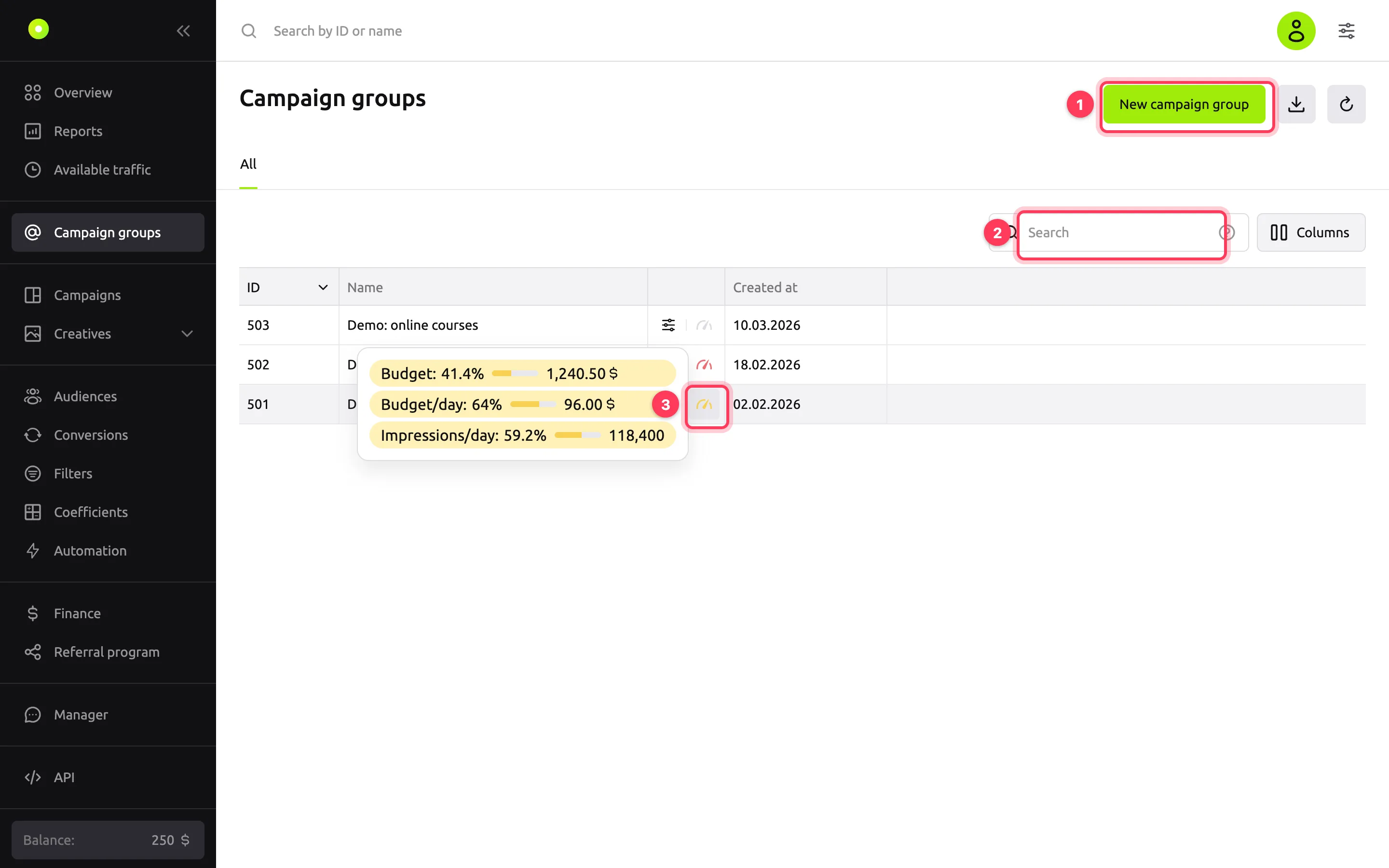
Callouts: 1 is the New campaign group button, 2 is the search, 3 is the group limit speedometer.
| Element | What it does |
|---|---|
| ID | The group number. Click the number to copy it |
| Name | Click the name to open the group settings |
| Menu and speedometer | The slider icon opens the group menu. The speedometer shows how much of the group limits is used: green is up to a third of the limit, yellow is up to two thirds, red is more, gray means there are no limits or no spend yet. Hover over it to see progress for each limit, or click it to open the Limits tab |
| Created at | When the group was created |
| Search | Searches by ID and by part of the name. To search by one field only, start the query with a label: id:501 searches by ID only, name:shoe by name only |
| Columns | Choose which columns to show and change their order |
| Down arrow button | Export the list to CSV or XLSX. The file contains the visible columns and the group limits |
| Circular arrow button | Refresh the list |
To sort the list by ID, Name or Created at, click the column header.
Group menu
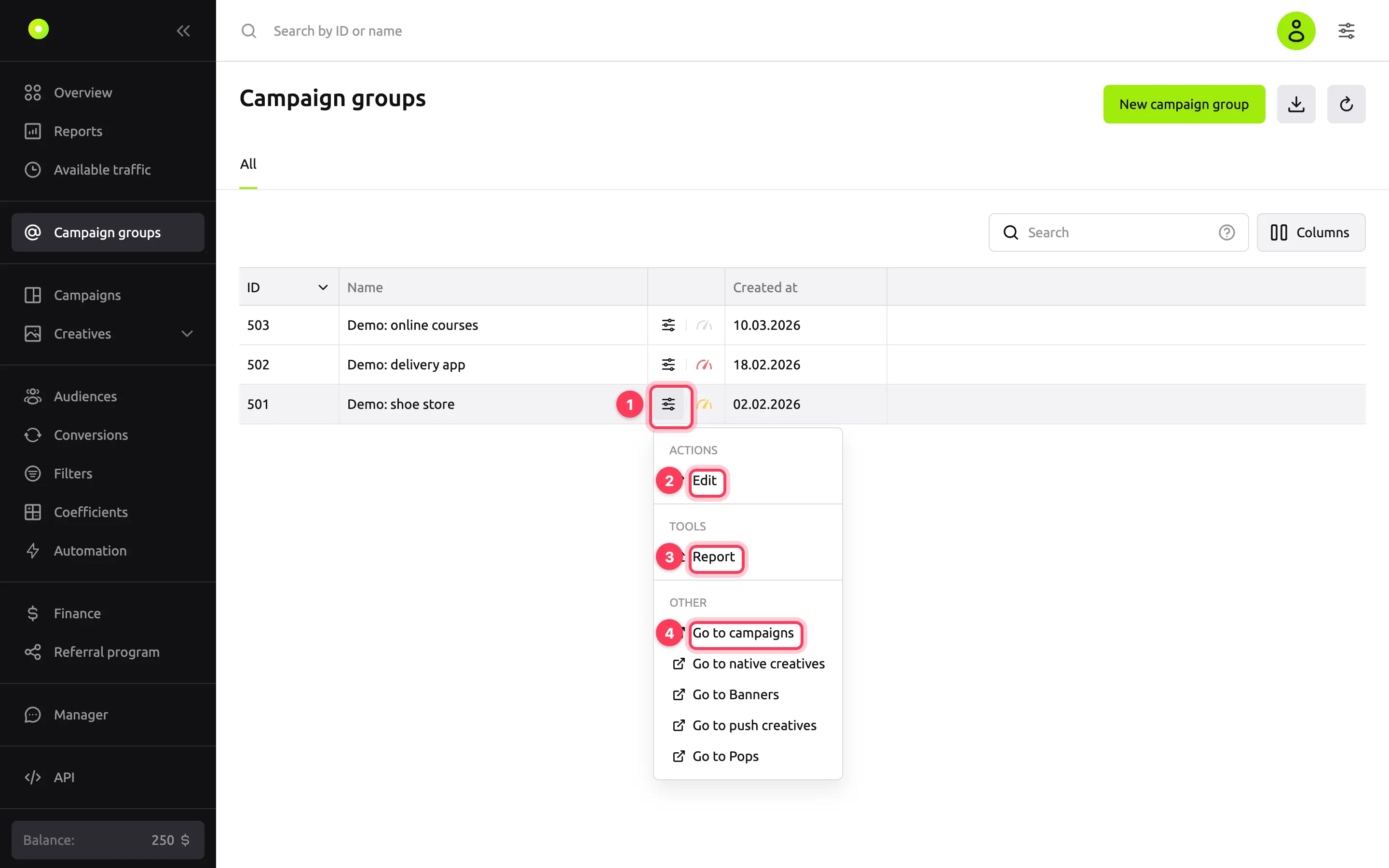
| Item | What it does |
|---|---|
| Edit | Opens the group settings |
| Report | Opens the report builder in a new tab, filtered by this group. For how to work with the report, see Build a report with nested groupings |
| Go to campaigns | Opens the list of this group's campaigns |
| Go to native creatives, Go to Banners, Go to push creatives, Go to Pops | Open the list of creatives of that format from the group's campaigns |
On the group page, the ⋯ button in the top right corner opens the same menu without Edit.
Create a group
- In the left menu, click Campaign groups.
- Click New campaign group.
- In the Campaign group name field, enter a name.
- Click Save general settings.
The dashboard opens the new group's page with the General settings and Limits tabs. You can also create a group from the campaign form: the Create button next to the Campaign group field opens the same form in a separate window. For details, see Campaign settings.
General settings
| Field | Meaning | Values and limits |
|---|---|---|
| Campaign group name | The name in the group list and in the Campaign group field of the campaign form | Up to 255 characters. You can change it at any time |
| Client price mode and Value | The client price for all campaigns in the group. Only agencies with permission to set a client price see the Client price block | The modes are the same as for a campaign: Not set, Percent, Fixed. A campaign uses the group's client price if Use campaign group's client price is selected in its settings |
The Save general settings button saves your changes. If you switch to another tab without saving, the dashboard offers to save the changes.
Group limits
Group limits cap all the group's campaigns together: the spend, clicks and impressions of every campaign in the group count toward the limit.
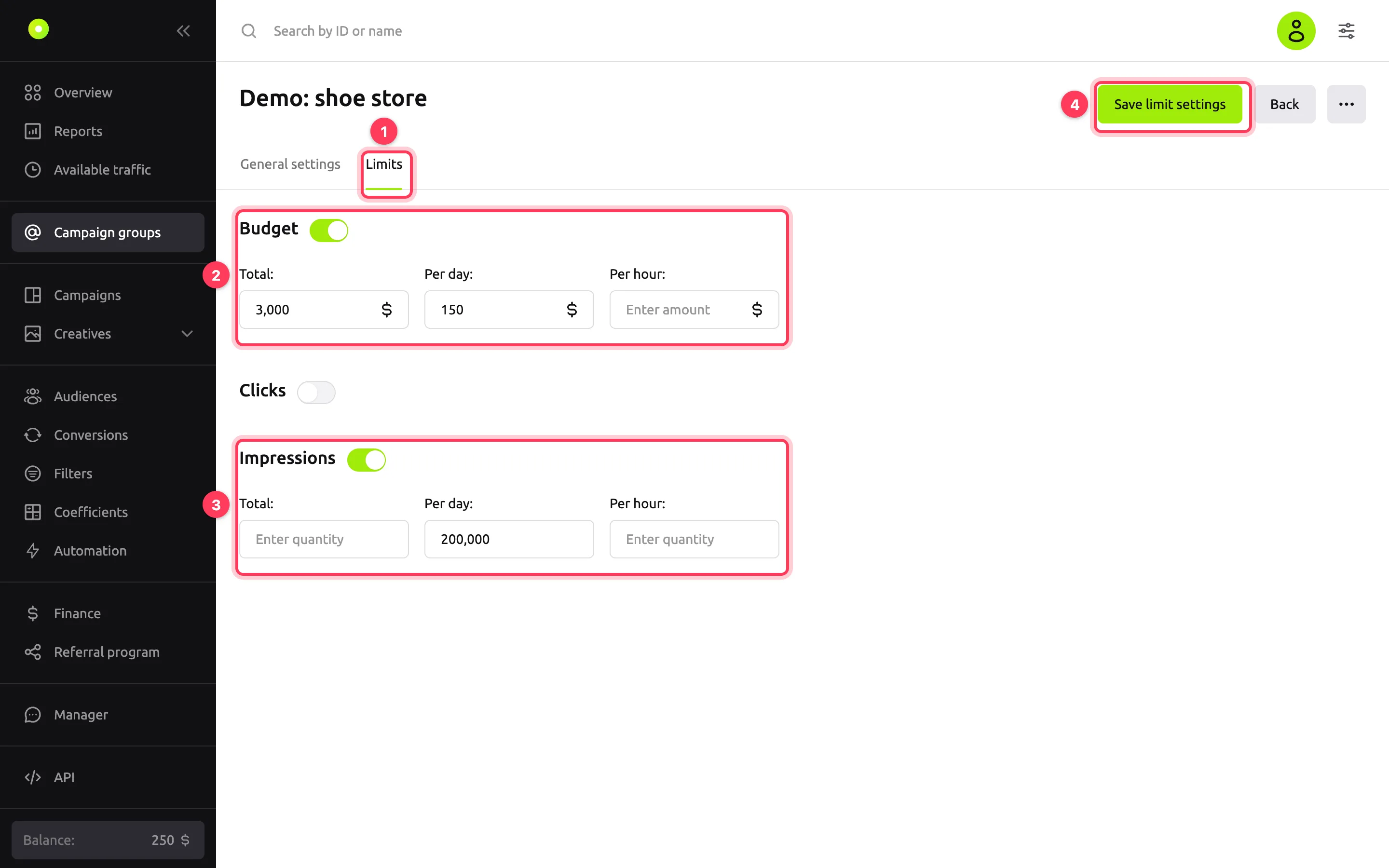
Callouts: 1 is the Limits tab, 2 is the Budget block, 3 is the Impressions block, 4 is the Save limit settings button.
| Block | Fields | Values and limits |
|---|---|---|
| Budget | Total, Per day, Per hour | An amount in your account currency. Minimum 0.1, one decimal place |
| Clicks | Total, Per day, Per hour | A whole number from 1 |
| Impressions | Total, Per day, Per hour | A whole number from 1 |
Each block has its own toggle. If you turn the toggle off, the block's values are cleared. An empty field means no limit.
How group limits combine with campaign limits
Both the group limits and each campaign's own limits apply. A campaign stops buying impressions as soon as any of them is reached: its own limit or the shared group limit. When a group limit is reached, all campaigns in the group stop.
Example: the group has Budget → Per day set to $150, and the group has two campaigns with a daily budget of $100 each. In a day, each campaign spends no more than $100, and both together no more than $150.
If a daily or hourly limit is reached, the group's campaigns resume in the next day or hour. Days and hours are counted in UTC: a new day starts at 00:00 UTC. If the Total limit is reached, they resume only after you raise or turn off the limit.
A group has no launch period, budget distribution, frequency cap or scheduler. You set them in each campaign on its Limits tab. For how, see Limit budget and impression frequency.
Related pages
- Limit budget and impression frequency: campaign limits.
- Work as an agency: clients and shared access: how to give a client access to a campaign group.
- Campaign settings: the Campaign group field and the campaign client price.