
Raise or lower the bid on specific placements
Goal
Pay more for zonesA specific ad slot on a site or in an app, for example a block on a site page. that bring clicks and conversions and less for weak ones, without turning them off completely. To do this, give a zone a selective coefficientA multiplier of the campaign bid for a specific zone or site.: the campaign bid in this zone is multiplied by it.
Before you start
- A campaign with statistics: the section shows only zones where the campaign has already run.
- Optimization is off in the campaign. If it is on, the platform picks the coefficients and you cannot change them manually. For details, see Bid optimization.
- To evaluate by conversions: a configured postback.
Steps
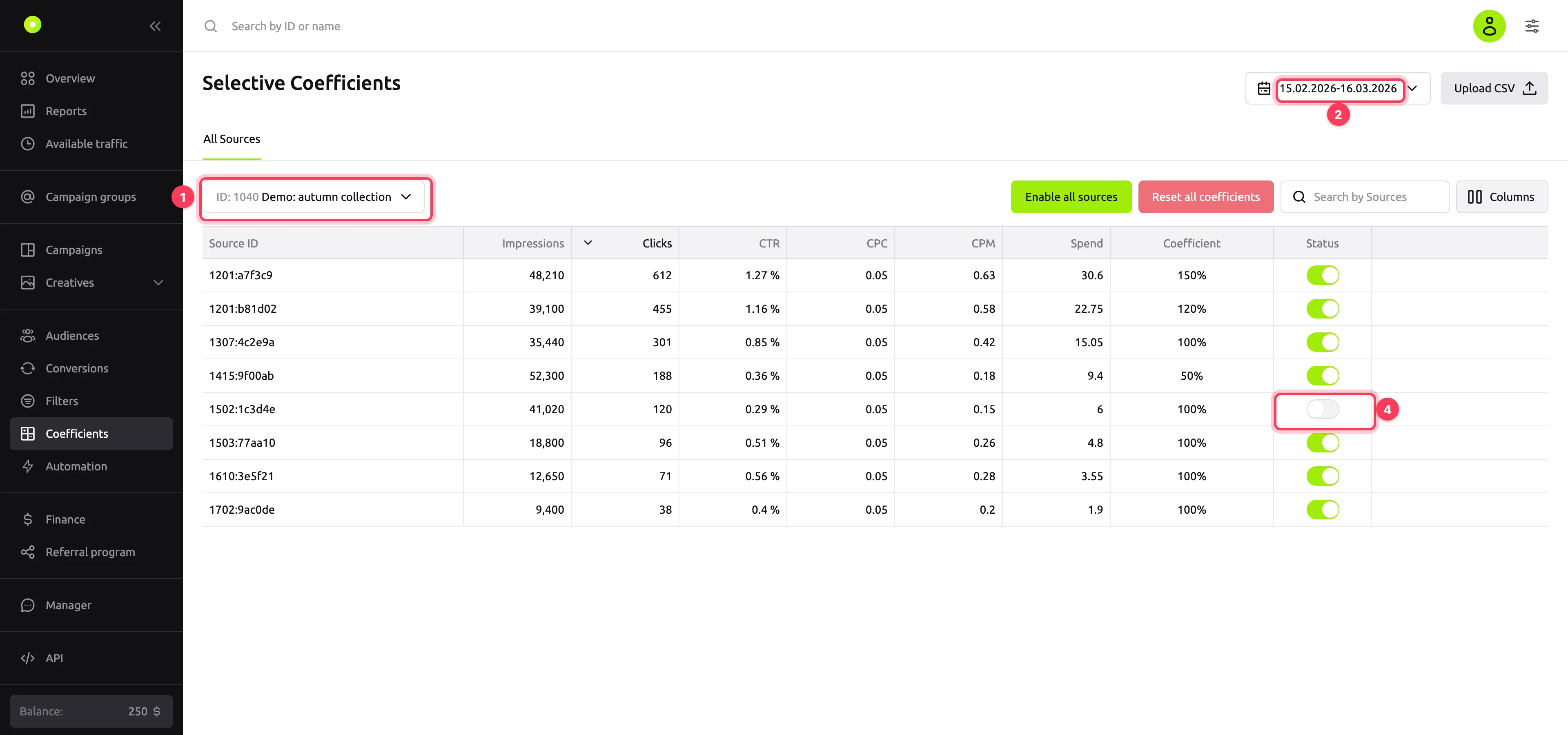
Open the Coefficients section in the left menu and select a campaign. Another way: in the campaign list, open the campaign menu and select Coefficients. The section opens with this campaign already selected.
In the top right, select a period of up to 30 days. Days are counted in Moscow time. The table shows the zones where the campaign ran during this period, with their statistics. The Columns button turns on the Conversions, CR, CPA, ROI, eCPC and eCPM columns. To find a zone, enter its full ID in the Search by Sources field: search by part of an ID does not work.
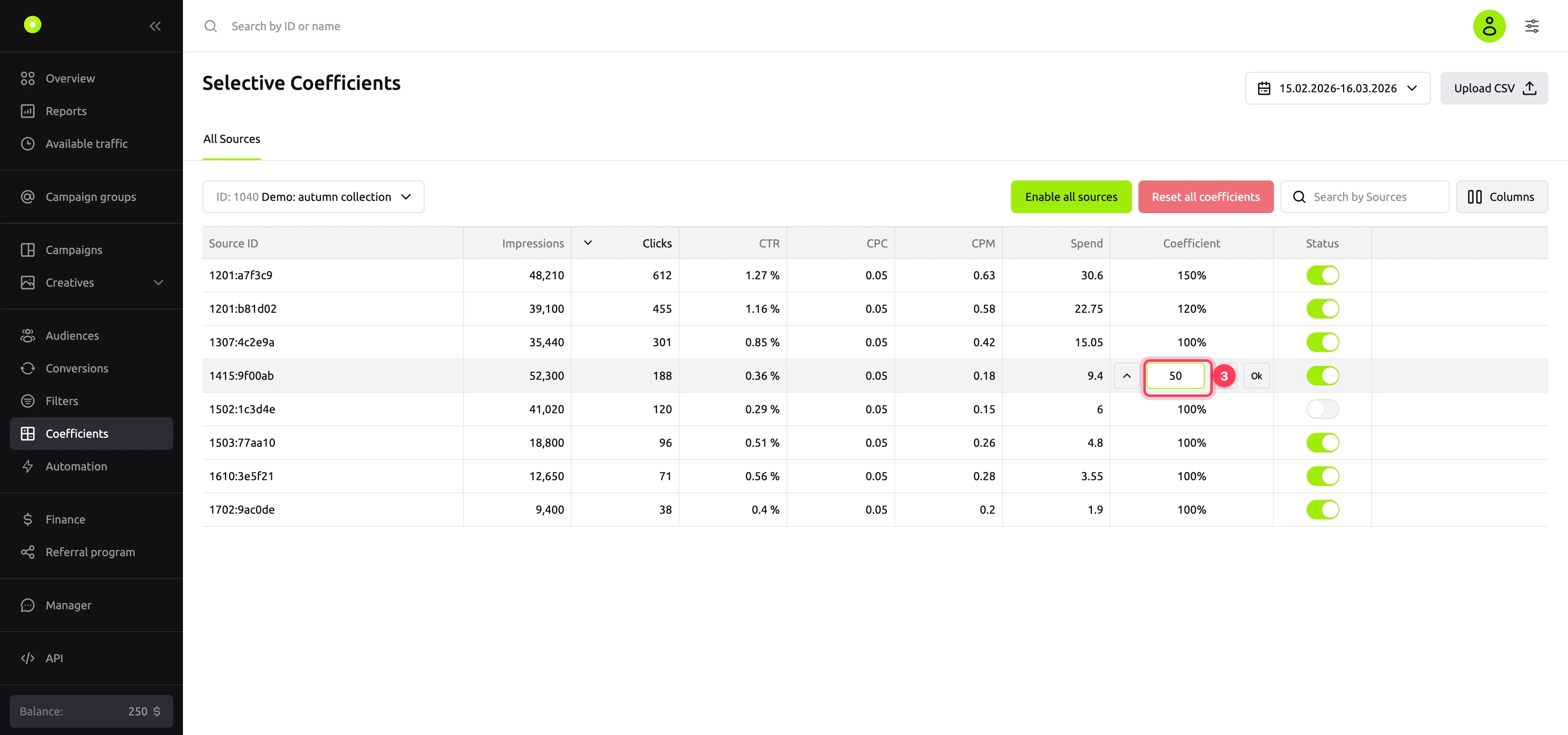
To change the bid in a zone, hover over the cell in the Coefficient column and click the pencil icon. Enter a percentage and click Ok. The arrows next to the field change the value by 10%.
To stop the campaign from buying a zone at all, turn off the toggle in the Status column.
Changes are saved immediately; there is no separate save button.
Result
The campaign bid in the zone is multiplied by the coefficient:
- 100%: the bid is unchanged. All zones have this value by default.
- 150%: the bid is one and a half times higher. The campaign wins the auction in this zone more often and pays more per impression or click.
- 50%: the bid is half as much. The zone gets fewer impressions, each one cheaper.
- 0%: the campaign does not take part in the auction in this zone.
Allowed values are from 0% to 5000%. If the campaign has other coefficients too, for example by geo or device, they are multiplied. For how the bid affects impressions, see Auction and bid.
The platform collects turned-off zones into a blacklist named "Selective coeffs of campaign …". You can see it on the campaign's Filters tab. For details, see Turn off poor placements with a filter.
All zones at once
- Reset all coefficients: set all zones of the campaign back to 100%. The dashboard asks for confirmation: click Yes, reset coefficients.
- Enable all sources: turn on all turned-off zones, including those not in the table for the selected period. Confirm with Yes, enable sources.
- Upload CSV: set coefficients from a file. The file replaces all coefficients of the campaign: zones not in the file go back to 100%.
File format: CSV with the .csv extension, up to 10 MB. The first row holds the column names, and the separator is a comma. The coefficient in the file is a multiplier, not a percentage: 1.5 means 150%.
zone_id,coeff
1201:a7f3c9,1.5
1415:9f00ab,0.5
Troubleshooting
| Symptom | Cause | Fix |
|---|---|---|
| The table is empty and the buttons are inactive | No campaign is selected | Select a campaign in the field on the left above the table |
| The zone you need is not in the table | The campaign did not run in this zone during the selected period | Select another period. To exclude a zone without statistics, use a filter |
| "Campaign optimization is enabled" above the table, and you cannot change a coefficient | Optimization is on | The platform manages the coefficients. You can exclude zones with a filter |
| "Automation is working" above the table, and you cannot change a coefficient | A zone automation rule is active in the campaign | Stop the rule. For details, see Set up automation rules |
| "The period is too long. The maximum period = 30 days" | The selected period is longer than 30 days | Shorten the period |
| Search does not find the zone | You entered part of the ID | Enter the full zone ID, for example 1201:a7f3c9 |
| "Value cannot be greater than 5000%" | The coefficient is above the allowed maximum | Enter a value from 0 to 5000 |
| "Value cannot be less than 0%" | The file has a negative coefficient | Enter a multiplier from 0 to 50 |
| "Invalid file type" | The file is not a CSV file | Save the table as .csv |
| "File size exceeds the maximum allowable" | The file is larger than 10 MB | Split the file or remove extra columns |
| "Invalid columns in the file…" when you upload a file | The file has no first row zone_id,coeff, or the columns are named differently | Fix the first row of the file |
| "Zone Id Duplicate is detected" | The same zone appears twice in the file | Keep one row per zone |
NOTE
An empty coefficient in the file counts as zero: the campaign stops buying this zone.
Next steps
- Turn off poor placements with a filter.
- Set up automation rules so that coefficients change automatically based on statistics.